Posts

Showing posts with the label AppScriptIDE

Google Apps Script Integration with Version control tool Bitbucket

Image
What is version control tools? Version control systems are a category of software tools that help a software team manage changes to source code over time. Version control software keeps track of every modification to the code in a special kind of database. If a mistake is made , developers can turn back the clock and compare earlier versions of the code to help fix the mistake while minimising disruption to all team members. Top version control tools for system:  Bitbucket  (Unlimited private and public repository)-- Currently I am using Github (free to create public repository) How to create/register account on Bitbucket Sign Up  Bitbucket It will check entered email Id, if it is correct it will ask User name and Password for Bitucket account. Check on I'm not robot option. Click on Continue, It will show next window " Verify your email " Bitbucket team will sent email on your given Id login your email, check email from  Atlassian (<no...
Google App Script editor overview

Image
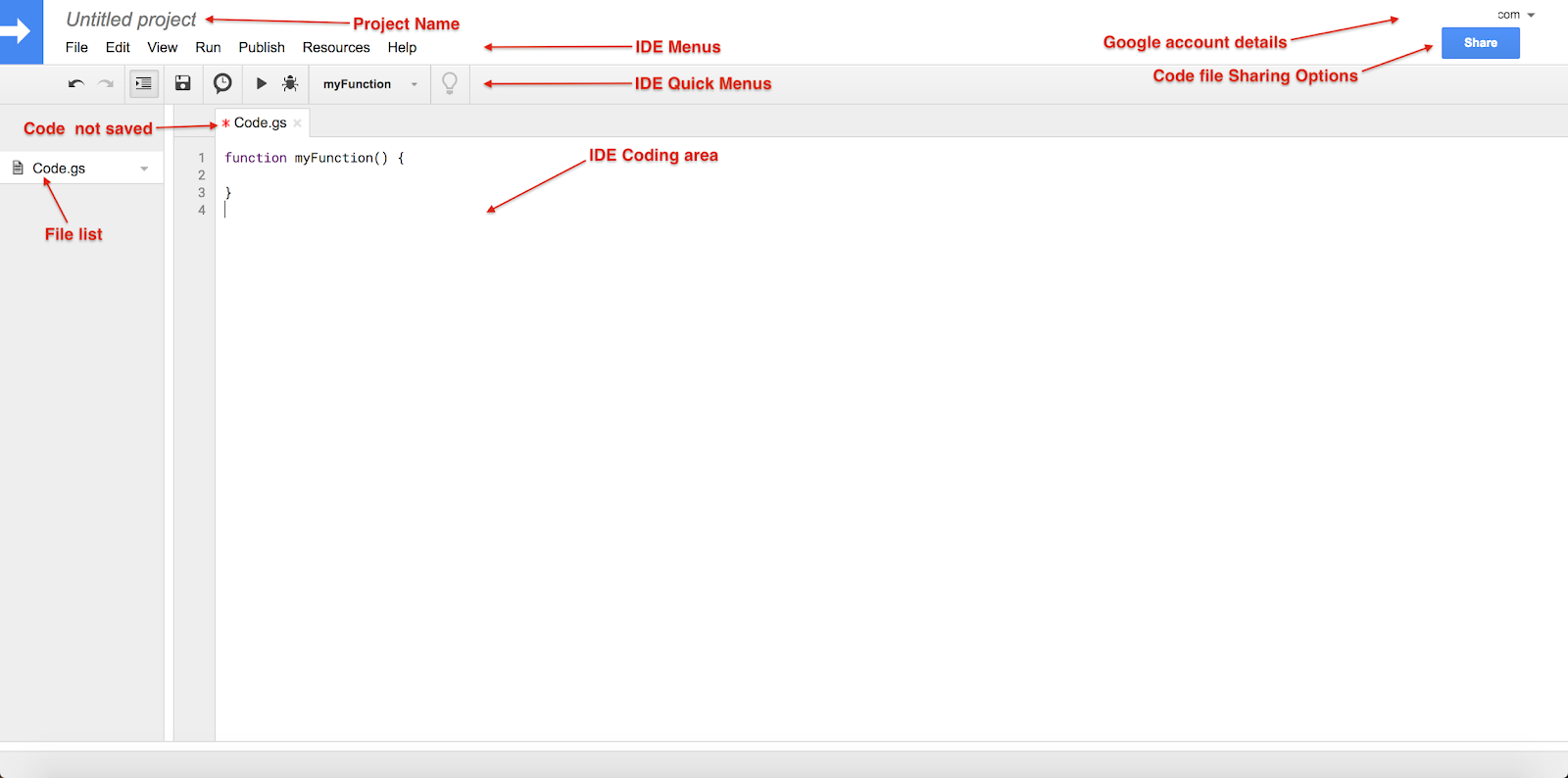
Google App Script IDE overview Google Apps Script IDE provides comprehensive facilities like intelligent code completion, debugger, content assist and many more to help developers to write code fast. Project Name : Save project with given name  Menus : File : To perform file related operations. New : It allow to create Script New Project,Code(.gs),HTML file and other Google files. Open… : It will redirect App Script Dashboard See version history : Compare code file changes (Don't expect like bitbucket  or git version control tools) Rename… : Rename existing project/script file. Make a copy : Make copy of current project Save : Save current coding data(Single) Save all : Save all coding files data (Multiple coding files) Manage versions… : It is useful when you publish App Script as Library. Share… : Sharing file with other users. Project Properties : It contain project key details like Info : basic information about current apps script project Sco...

Google Apps Script IDE overview

Image
Google App Script IDE overview Google Update: This version of the Apps Script editor will be completely turned off soon. Google Apps Script IDE having multiple options as below... Project Name : Save project with given name  Menus : File : To perform file operations New : It allows to create New Project, Code(.gs), HTML files and other Google files. Open …: It will redirect to App Script Dashboard See version history : Compare code file changes (Don't expect like git) Rename …: Rename existing project/script file. Make a copy : Make copy of current project Save : It saves written code (Single) Save all : It saves written code (Multiple) Manage versions …: It is useful when you publish App Script as Library. Share …: Sharing file with other users. Project Properties : It contain project key details like Info : Basic information about current apps script project Scopes : List of all scopes used in current project User properties : It will manage Use...

Enable Google App Script IDE

Image
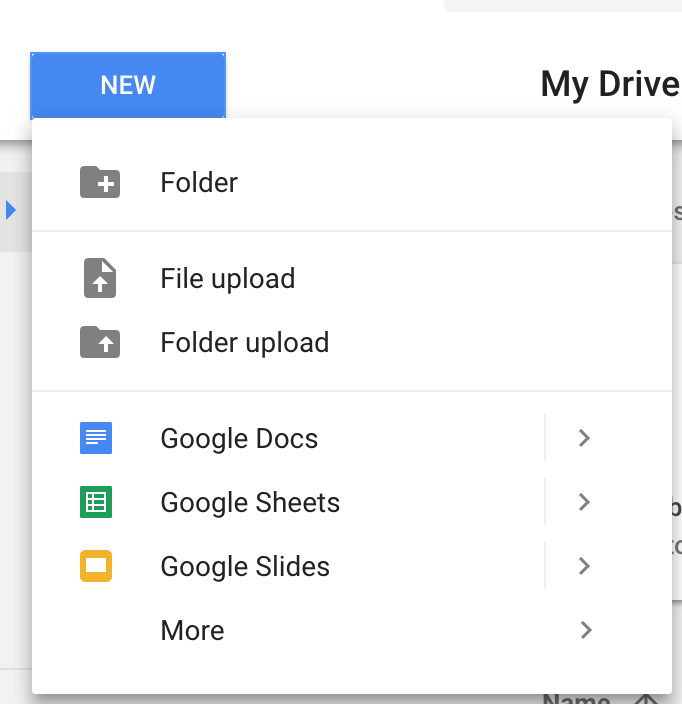
Enable Google App Script IDE Login your Google Drive account ( https://drive.google.com/drive/ ) Click on NEW button. Click on More Click on Connect More apps, It will redirect Drive app center. Search App Script → Click on +CONNECT   ( It will take few second to install ) After installation CONNECT will change to RATE IT Close Connect apps to Drive popup, Google App Script now added in Drive app list. Click on More → Click on Google Apps Script apps Google Apps Script will redirect to App Script editor. Project Name: It will help to save app script project file in Google drive Menus: More options to perform activities Quick Menus: Useful menu shortcuts  Code save (Indicator): Helps to monitor code is saved or not Coding area: Actual part to write code File list: Display all project files (script file .gs & HTML file .html) Google account details: User email ID Coding File sharing options: Helps to share file like Google docs ...