Posts

Google Apps Script Data Types, Variables, Special characters and Comments
Image
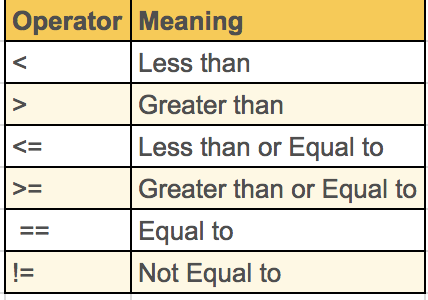
Google Apps Script Data Types, Variables, Special characters and Comments Numbers Defining a number in Google Apps Script  is actually pretty simple. The Number data type includes any positive or negative integer, as well as decimals. Entering a number into the logger will return it right back to you. function code1(){ var accountNumber=123456701; Logger.log(accountNumber) } O/p=[18-02-15 15:21:05:813 IST] 1.23456701E8 Arithmetic operations You can also perform calculations with numbers pretty easily. Basically type out an expression the way you would type it in a calculator. function code2(){ var sum=1+3.2; Logger.log(sum); } O/p=[18-02-15 15:21:06:813 IST] 4.2 Comparing numbers Comparisons between numbers will either evaluate to true or false. function code3(){ var comp=6>11; Logger.log(comp); } o/p=[18-02-15 15:21:06:813 IST] false function code4(){ var comp=6<11; Logger.log(comp); } o/p=[18-02-15 15:39:59:907 IST] true String Strings are a collect...
Google App Script editor overview

Image
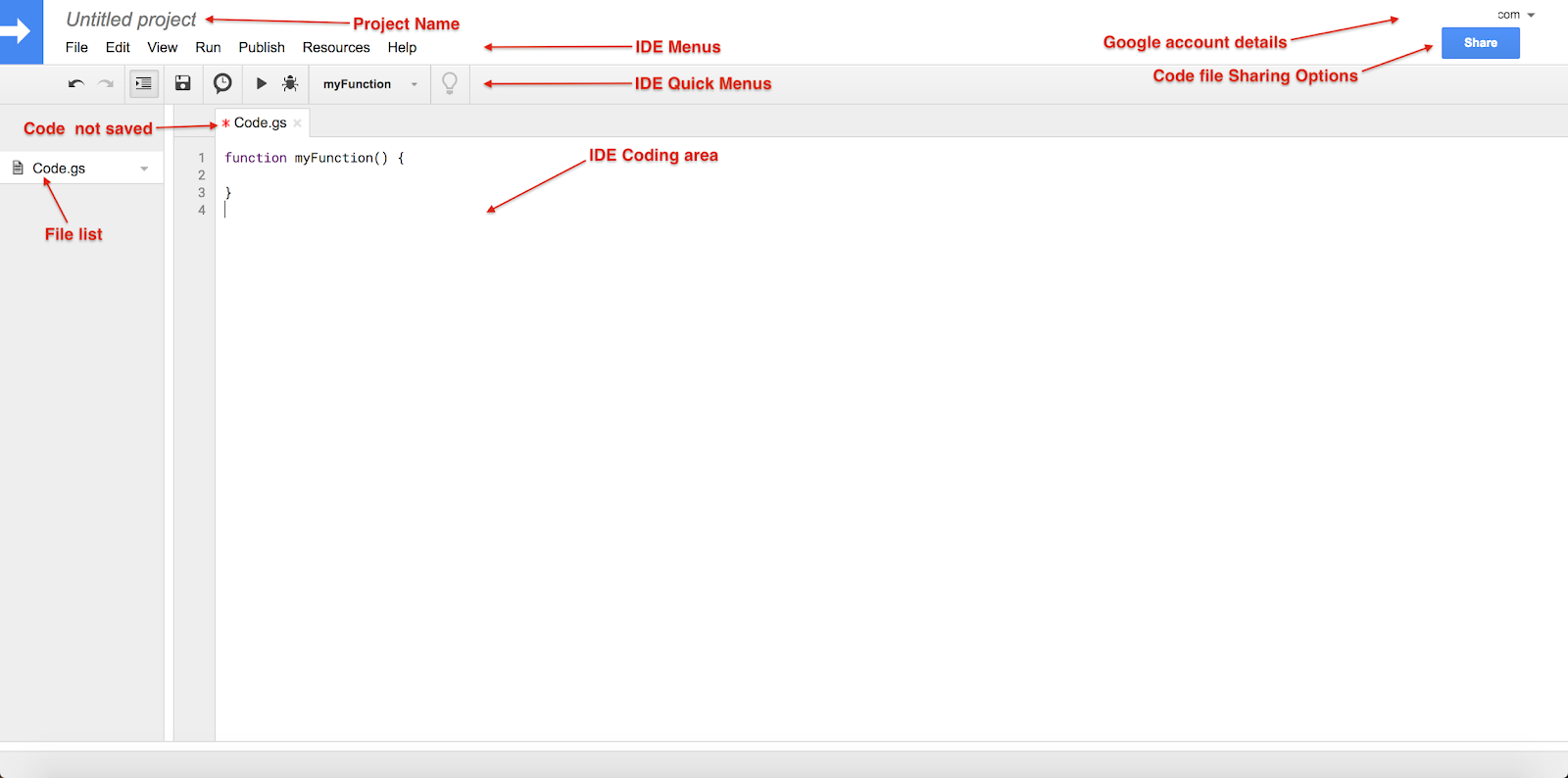
Google App Script IDE overview Google Apps Script IDE provides comprehensive facilities like intelligent code completion, debugger, content assist and many more to help developers to write code fast. Project Name : Save project with given name  Menus : File : To perform file related operations. New : It allow to create Script New Project,Code(.gs),HTML file and other Google files. Open… : It will redirect App Script Dashboard See version history : Compare code file changes (Don't expect like bitbucket  or git version control tools) Rename… : Rename existing project/script file. Make a copy : Make copy of current project Save : Save current coding data(Single) Save all : Save all coding files data (Multiple coding files) Manage versions… : It is useful when you publish App Script as Library. Share… : Sharing file with other users. Project Properties : It contain project key details like Info : basic information about current apps script project Sco...

Change Google App Script Editor Color

Image
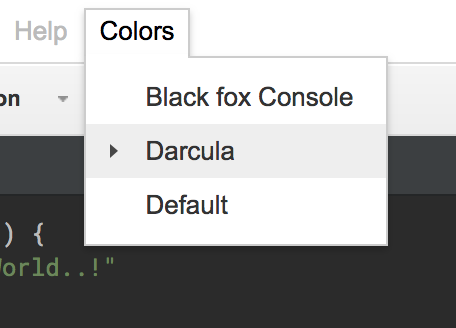
Change Google App Script Editor Color Hi Developers, If you are familiar with dark background and feeling Google Apps Script IDE color not suitable for you? here is the solution you can change your Google Apps Script IDE color schemes. Install " AppsScriptColor " chrome extension Link: https://chrome.google.com/webstore/detail/appsscript-color/ciggahcpieccaejjdpkllokejakhkome?utm_source=gmail Refresh your Google Apps Script Editor browsers ( It will works only on Chrome Browsers ) It will add Colors menu in IDE (I like Darcula coding colors) Happy Coding.... AppsScriptColor Chrome extension added with owner ( Jean-Rémi Delteil ) permission.

Hello World Using Google App Script

Image
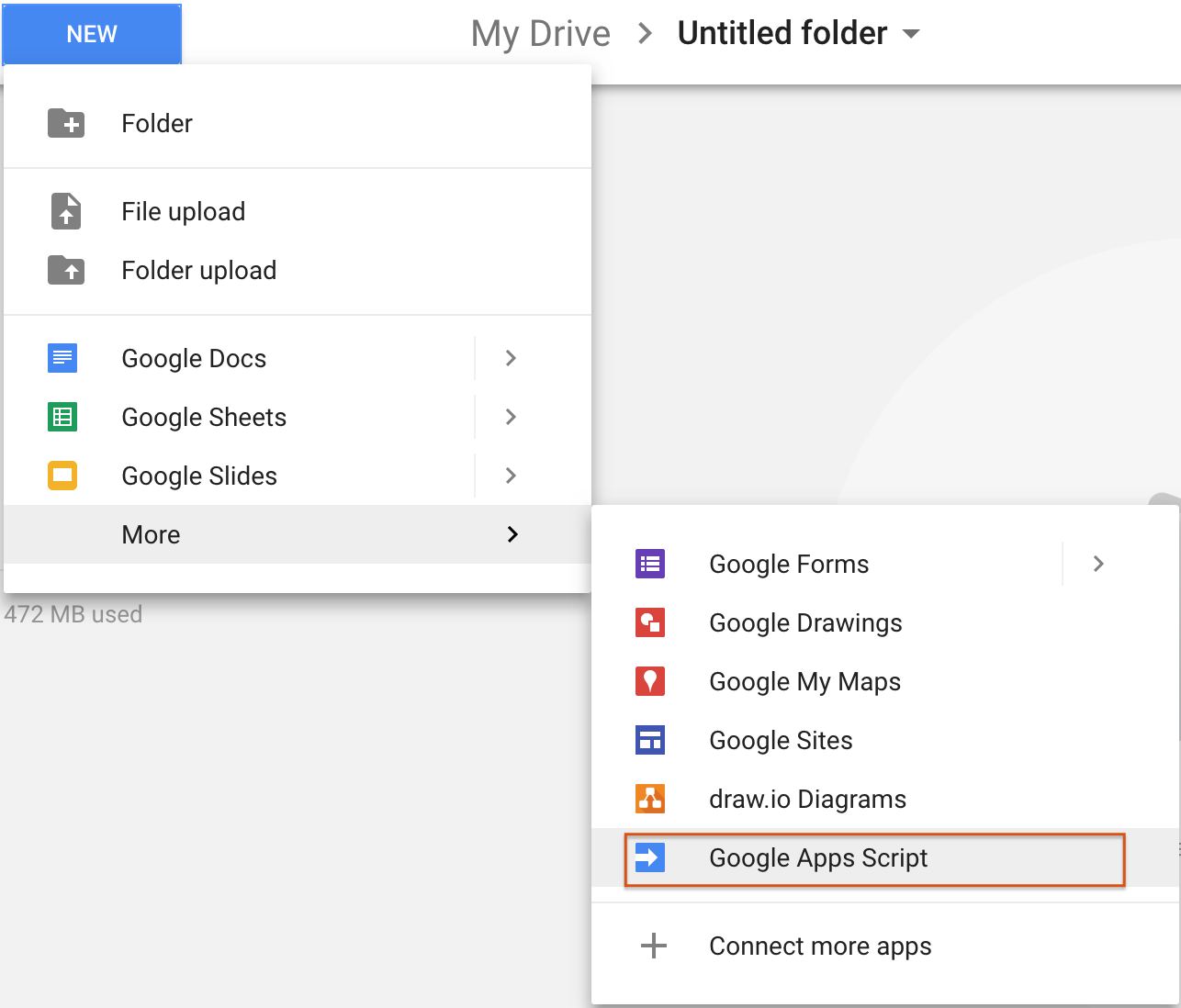
Hello world in Google App Script Go to Your Google drive Go to your Google drive  Login your Google Drive account ( https://drive.google.com/drive/ ) Click on NEW button Go to More  → Click on Google Apps Script apps Google Apps Script link redirect to App Script editor Rename untitled project to meaning full one Here we are using “First App Script Project” Add below code in Coding area. function myFunction() {    var msg="Hello World..!"; Logger.log(msg) } Save code (Ctrl+S/⌘+S ) Run functions: Click on Run-- > Run function --> myFunction (Ctrl+R /⌘+R) View Logs: Click on View → Logs (Ctrl+Enter / ⌘+Enter) Script Output: It will show result with timestamp. Now your ready for dive in Google Apps Script coding…! Happy Coding...

Google Apps Script IDE overview

Image
Google App Script IDE overview Google Update: This version of the Apps Script editor will be completely turned off soon. Google Apps Script IDE having multiple options as below... Project Name : Save project with given name  Menus : File : To perform file operations New : It allows to create New Project, Code(.gs), HTML files and other Google files. Open …: It will redirect to App Script Dashboard See version history : Compare code file changes (Don't expect like git) Rename …: Rename existing project/script file. Make a copy : Make copy of current project Save : It saves written code (Single) Save all : It saves written code (Multiple) Manage versions …: It is useful when you publish App Script as Library. Share …: Sharing file with other users. Project Properties : It contain project key details like Info : Basic information about current apps script project Scopes : List of all scopes used in current project User properties : It will manage Use...